> ## Documentation Index
> Fetch the complete documentation index at: https://docs.sayvyai.com/llms.txt
> Use this file to discover all available pages before exploring further.
# Authentication
> Authenticate API requests using scoped secret Bearer tokens
# API Authentication
All requests to the Sayvy AI REST API require an API key passed via the standard HTTP `Authorization` Bearer header.
```http theme={null}
Authorization: Bearer sayvy_sk_live_your_secret_key
```
**Keep your API keys safe**: Never commit API keys to public source control, distribute them in client-side applications (such as mobile or frontend browser bundles), or expose them publicly.
***
## Generating an API Key
You can create and manage API keys directly in the **Sayvy AI Console**:
1. Navigate to **Developers > API Keys** in the sidebar.
2. Click **Create New API Key**.
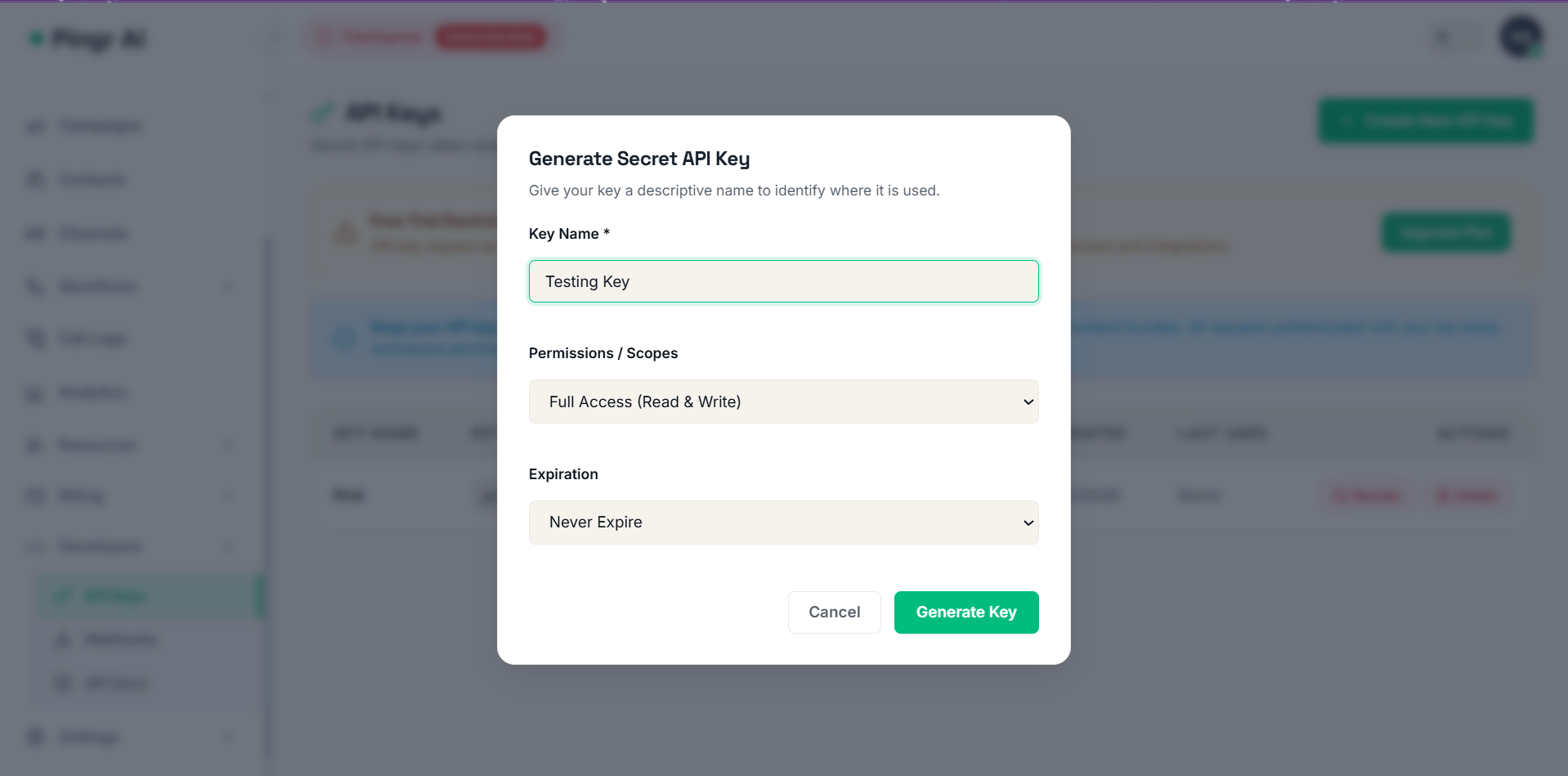
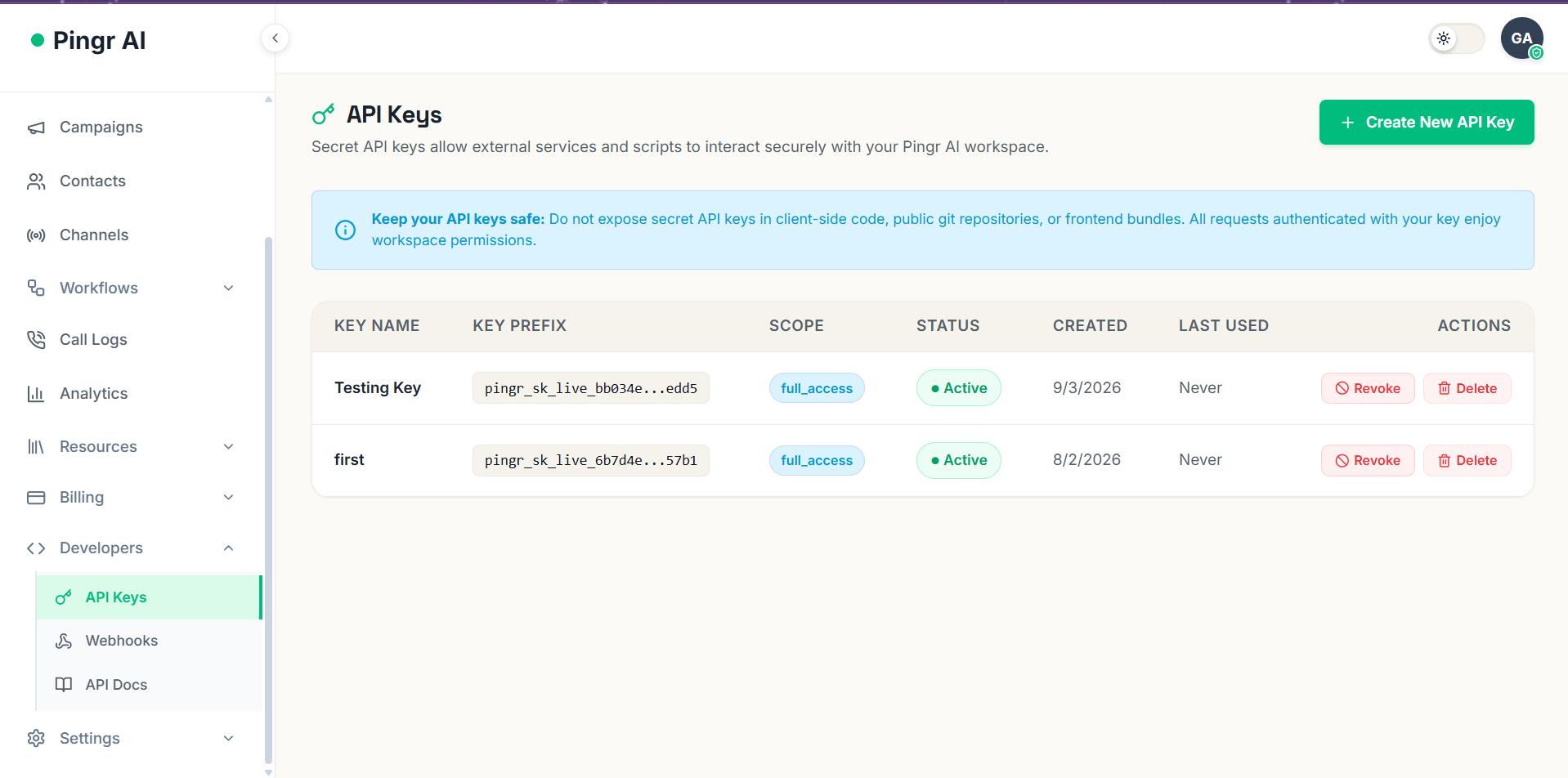 3. Provide a descriptive key name (e.g. `Production Call Worker`), set permissions/scopes, and select an optional expiration date.
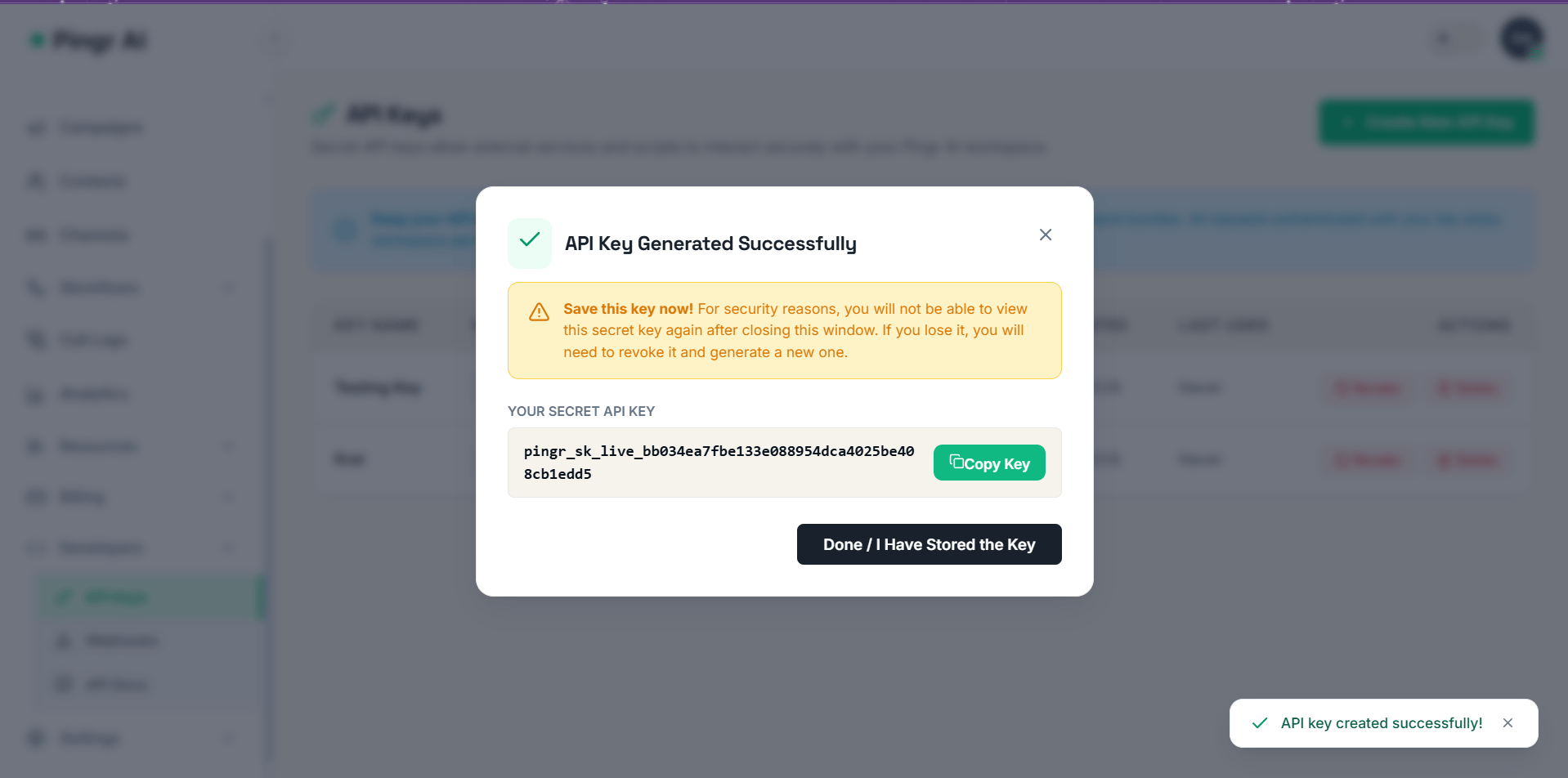
 4. Copy your secret key immediately. For security, Sayvy AI never reveals the full secret key again.
 ***
## Key Types & Environments
Sayvy AI offers two types of keys:
| Key Type | Prefix | Description |
| :------------------ | :------------------ | :----------------------------------------------------------------------------------------------------- |
| **Live Secret Key** | `sayvy_sk_live_...` | Interacts with live telephony trunks, sends real SMS/WhatsApp messages, and consumes billable credits. |
| **Test Secret Key** | `sayvy_sk_test_...` | Interacts with mock telephony carriers and simulated endpoints. Does not trigger real charges. |
***
## Granular Scopes
You can restrict API keys to specific permissions:
* `full_access`: Unrestricted access across all workspace resources.
* `agents:read`: List and fetch voice agent configurations.
* `agents:write`: Create, update, or delete voice agents.
* `calls:dispatch`: Trigger outbound phone calls and WebRTC sessions.
* `calls:read`: View call logs, metrics, recordings, and transcripts.
* `campaigns:manage`: Create and schedule outbound batch campaigns.
* `webhooks:admin`: Manage webhook endpoints and signing secrets.
***
## Making Authenticated Requests
### cURL Example
```bash theme={null}
curl -X GET https://api.sayvy.ai/api/v1/agents \
-H "Authorization: Bearer sayvy_sk_live_bb034ea7fbe133e088954dca4025be408cb1edd5" \
-H "Content-Type: application/json"
```
### Node.js / TypeScript Example
```typescript theme={null}
const response = await fetch('https://api.sayvy.ai/api/v1/agents', {
headers: {
'Authorization': `Bearer ${process.env.SAYVY_API_KEY}`,
'Content-Type': 'application/json',
},
});
const data = await response.json();
console.log(data);
```
### Python Example
```python theme={null}
import os
import requests
api_key = os.environ.get("SAYVY_API_KEY")
headers = {
"Authorization": f"Bearer {api_key}",
"Content-Type": "application/json",
}
response = requests.get("https://api.sayvy.ai/api/v1/agents", headers=headers)
print(response.json())
```
***
## Failed Authentication
If an API key is missing, invalid, or lacks required scopes, Sayvy AI responds with a `401 Unauthorized` or `403 Forbidden` status code:
```json theme={null}
{
"error": {
"code": "invalid_api_key",
"message": "The provided API key is expired, revoked, or formatted incorrectly.",
"type": "authentication_error"
}
}
```
***
## Key Types & Environments
Sayvy AI offers two types of keys:
| Key Type | Prefix | Description |
| :------------------ | :------------------ | :----------------------------------------------------------------------------------------------------- |
| **Live Secret Key** | `sayvy_sk_live_...` | Interacts with live telephony trunks, sends real SMS/WhatsApp messages, and consumes billable credits. |
| **Test Secret Key** | `sayvy_sk_test_...` | Interacts with mock telephony carriers and simulated endpoints. Does not trigger real charges. |
***
## Granular Scopes
You can restrict API keys to specific permissions:
* `full_access`: Unrestricted access across all workspace resources.
* `agents:read`: List and fetch voice agent configurations.
* `agents:write`: Create, update, or delete voice agents.
* `calls:dispatch`: Trigger outbound phone calls and WebRTC sessions.
* `calls:read`: View call logs, metrics, recordings, and transcripts.
* `campaigns:manage`: Create and schedule outbound batch campaigns.
* `webhooks:admin`: Manage webhook endpoints and signing secrets.
***
## Making Authenticated Requests
### cURL Example
```bash theme={null}
curl -X GET https://api.sayvy.ai/api/v1/agents \
-H "Authorization: Bearer sayvy_sk_live_bb034ea7fbe133e088954dca4025be408cb1edd5" \
-H "Content-Type: application/json"
```
### Node.js / TypeScript Example
```typescript theme={null}
const response = await fetch('https://api.sayvy.ai/api/v1/agents', {
headers: {
'Authorization': `Bearer ${process.env.SAYVY_API_KEY}`,
'Content-Type': 'application/json',
},
});
const data = await response.json();
console.log(data);
```
### Python Example
```python theme={null}
import os
import requests
api_key = os.environ.get("SAYVY_API_KEY")
headers = {
"Authorization": f"Bearer {api_key}",
"Content-Type": "application/json",
}
response = requests.get("https://api.sayvy.ai/api/v1/agents", headers=headers)
print(response.json())
```
***
## Failed Authentication
If an API key is missing, invalid, or lacks required scopes, Sayvy AI responds with a `401 Unauthorized` or `403 Forbidden` status code:
```json theme={null}
{
"error": {
"code": "invalid_api_key",
"message": "The provided API key is expired, revoked, or formatted incorrectly.",
"type": "authentication_error"
}
}
```